
Chavruti in Claude
One link opens Claude’s connector form with Chavruti filled in. Then press Connect and sign in. It works in claude.ai, the desktop app and the phone apps. A Claude plan that offers custom connectors.
https://api.chavruti.ai/mcpHave a Chavruti account
Start your 14 free days with Google or an email address, or sign in if you have an account. Connecting your assistant and setting up your learning can happen in either order.
Add the connector
This link opens Claude's Add custom connector with the name and URL filled in. Check that it says
https://api.chavruti.ai/mcpand press Continue. By hand: Customize → Connectors → Add → Add custom connector, name it whatever you like (the link fills inChavruti • חַבְרוּתִי; plainChavrutiis fine), the URL above. Leave the authentication settings as they are; there's no key to paste.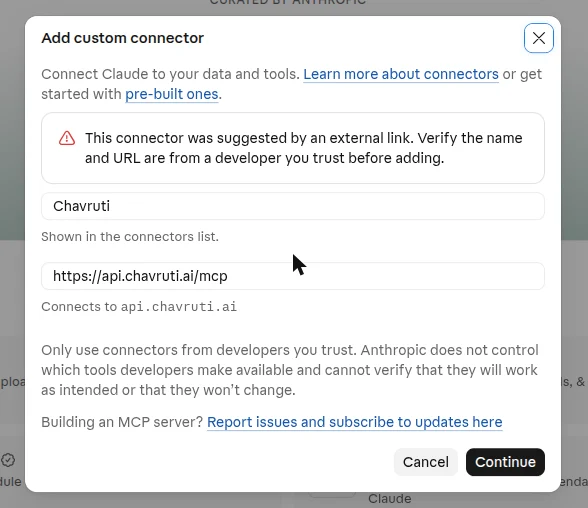
Press Connect
Adding isn't connecting. In Customize → Connectors, open Chavruti and press Connect. Until you do, Claude has none of Chavruti's tools.
Sign in to Chavruti and approve
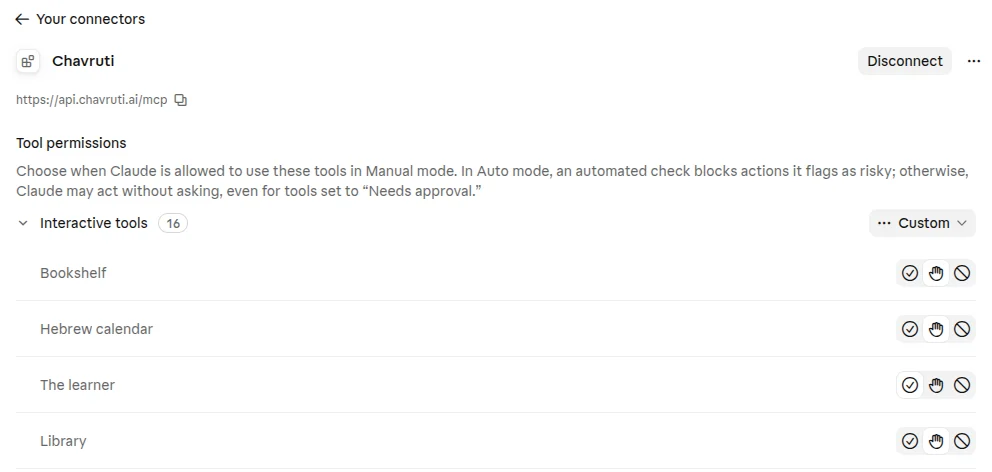
Chavruti's own page opens and names the assistant asking. Sign in if you aren't already, then choose Learn with you so Claude can record what you learn, or View only to let it read without recording, and press Approve. You can remove the connection any time in the Chavruti app under Settings → Assistants. Back in Claude, Chavruti shows Disconnect and lists its tools.
Say hello
Start a new chat and say "Let's start learning with Chavruti." Your assistant asks a few questions about you, then opens a real text with you within the first few minutes.
Questions
Do I add it on each device?
No. The connector belongs to your Claude account, so the browser, the desktop app and the phone apps all have it once it’s connected.
What about Claude Code?
Run claude mcp add --transport http chavruti https://api.chavruti.ai/mcp --scope user, then /mcp, choose Chavruti and Authenticate.
How do I disconnect?
In the Chavruti app, open Settings → Assistants and press Disconnect; it stops working at once. You can also remove Chavruti in Claude's own settings. Your learning record stays in Chavruti either way.