
Chavruti in ChatGPT
Add Chavruti as a custom MCP server under Plugins, then sign in. It works in chatgpt.com and the desktop app. A ChatGPT plan or workspace that allows custom MCP servers. In a workspace, an administrator may have to allow them.
https://api.chavruti.ai/mcpHave a Chavruti account
Start your 14 free days with Google or an email address, or sign in if you have an account. Connecting your assistant and setting up your learning can happen in either order.
Open Plugins and choose Add custom MCP server
In ChatGPT, open Plugins from the left-hand bar (or chatgpt.com/plugins), press Add at the top right, and choose Add custom MCP server. If it isn't in the menu, your plan or workspace doesn't allow custom servers yet.
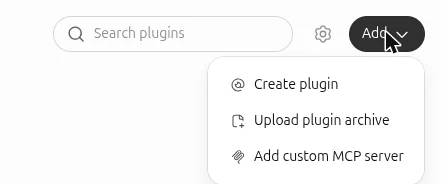
Fill it in and create it
Name it whatever you like:
Chavruti • חַבְרוּתִי(copy it from here) or plainChavruti. If you like, describe it as Learn Jewish texts together. Under Connection keep Server URL and pastehttps://api.chavruti.ai/mcp. Leave Authentication on OAuth and the advanced OAuth settings as they are. Tick I understand and want to continue and press Create as a plugin.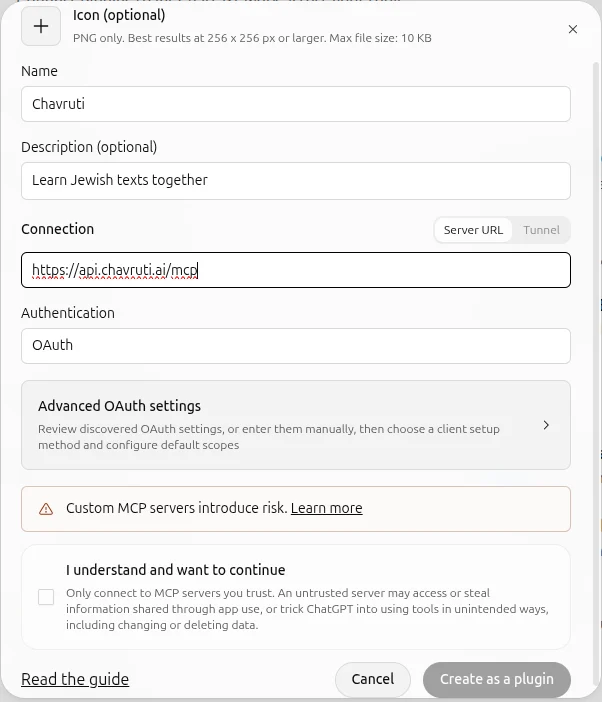
Sign in to Chavruti and approve
Chavruti's own page opens and names the assistant asking. Sign in if you aren't already, then choose Learn with you so ChatGPT can record what you learn, or View only to let it read without recording, and press Approve. You can remove the connection any time in the Chavruti app under Settings → Assistants.
Say hello
Start a new chat and say "Let's start learning with Chavruti." Your assistant asks a few questions about you, then opens a real text with you within the first few minutes.
Questions
Is Chavruti in ChatGPT’s plugin directory?
Not yet. Until it is, this custom server is how to connect, and it works the same way.
ChatGPT doesn’t use Chavruti in a chat.
Mention it by name (“with Chavruti”) or choose it from the plugins in the message box, so ChatGPT knows to use it.
How do I disconnect?
In the Chavruti app, open Settings → Assistants and press Disconnect; it stops working at once. You can also remove Chavruti in ChatGPT's own settings. Your learning record stays in Chavruti either way.